I'm a fan. I was looking for something a bit more like a vscode experience with kakoune/helix style keybindings, but everything seemed to be either 100% terminal or vim-style. I was quite interested in https://lapce.dev/ also written in rust, but as I say, vim-style rather than kakoune/helix style.
Have you looked at Neovide? It's very similar to this, a cross-platform Rust based GUI front end for neovim. Neovide is really quite nice; it's beautifully rendered.
My primary use case for Neovide (vs neovim running in Wezterm/kitty/Alacritty) is simply so I can Alt/Cmd-TAB to it quickly as I usually run with many terminal windows open and it's somewhat of a chore to locate the one with nvim in it, whereas with Neovide I have a separate app with an icon in the dock/sysmenu to switch to.
>My primary use case for Neovide (vs neovim running in Wezterm/kitty/Alacritty) is simply so I can Alt/Cmd-TAB to it quickly as I usually run with many terminal windows open and it's somewhat of a chore to locate the one with nvim in it, whereas with Neovide I have a separate app with an icon in the dock/sysmenu to switch to.
In Sway I have long (across three different terminal emulators) had a setup where I launch specially named terminals on session start, e.g. term-editor, term-local, term-remote, and then use the custom titles (I guess it's an appid actually) in my Sway config to make keybinds to focus those specific windows. I also focus my other always-used programs via their default appid (wayland) or class (xwayland), terminals just have the issue you mentioned of dealing with multiple, so had to use something more specific.
That last one makes the editor terminal always launch on workspace 1 which makes it a bit easier to get things where I'm used to having them after a restart.
The bind looks for emacs before my special term as I was using emacs (with evil) for a bit and had the bind set up to focus that. I left it in because this way if I just have one or the other open at some point, the bind works as expected without me having to change the config back and forth. Though with both open my focus ends up on the terminal.
Most terminal emulators should support a similar argument for launching with a custom id/title/whatever, and even if you're not using i3 or Sway, I think there are other programs such as wmctrl which can do something similar.
Surely you can just fix the cmd-tab behavior? I've always imagined the defaults were tuned for non-techies, because they don't exactly do well with many windows.
App detection, which breaks simple things like alt tab and more complicated things keyboard rebindings via external tools (and all the other cooperation with utilities based on app detection), then poor keybinding support of terminals with whole modifiers missing
> Sending key presses as escape sequences requires that terminal applications are able to recognize and parse those sequences, so it is not something that “just works” out of the box. However, the kitty keyboard protocol has been widely adopted by both modern terminal emulators and terminal applications. Terminals which support the kitty keyboard protocol (to some degree) include Wezterm, Alacritty, kitty, foot, Ghostty, and iTerm2. Applications which support the kitty keyboard protocol (to some degree) include Vim, Neovim, Helix, kakoune, and nushell. This means that when using one of these applications in one of these terminals, all of the key encoding problems discussed above (as well as some others which were not discussed…) are solved.
At least I indeed saw no such issue using helix in wezterm for example.
App detection is being able to tell which app you're using, e.g., knowing that you're using Helix and not just WezTerm
Poor key binding support is still a problem despite the optimistic quote (and might last for one more generation given the snail speed of progress). For example, the kitty protocol isn't "comprehensive" despite its dev's claims: it doesn't support left vs right modifiers and also some non-standard modifiers that are used to circumvent this limitation (only hyper)
> At least I indeed saw no such issue using helix in wezterm for example.
I think helix still doesn't support even the full kitty protocol, e.g., the Windows key.
And I do see these issues since I'm using richer keybindings to make input more ergonomic.
I did and I comprehended that you want left and right modifiers to be different. The rest of the world disagrees with you. That does not give you the license to go around maligning other people's work.
You're too limited in your perspective to speak for the rest of the world, for example, you had no clue that the bigger part of the OS world - Windows - doesn't disagree (though that failed to become a learning opportunity).
So there is enough better design in the world to call out lack of comprehension in both other people's work and other people
Name one windows application used by more than 10 people that supports independent left and right modifier keys used as modifiers. One application. Just because the windows API for some inexplicable reason exposes those states. Meanwhile let me name some of the most popular applications in the world on Windows that explicitly dont support this.
1) Chrome
2) Edge
3) Microsoft Word
4) Windows Explorer
5) Windows command prompt and windows terminal
6) VLC
7) LibreOffice
8) Every terminal emulator under the sun
9) Firefox
10) Pick any windows application at random
Just because you WANT left and right modifiers to be different doesnt make it a good idea. Learn that.
> Name one windows application used by more than 10 people
Even though you've tried to limit yourself to basically 3 apps by different vendors (what a shallow view of the app world), and even though you've included some awful browsers that don't even allow users to rebind default(!) keybinds (are you going to argue now that this is also good and just because I WANT to change keybindings, it's not a good idea and your imaginary world disagrees?), and the platform so bad at keybinding support that it requires a whole new pseudo-comprehensive keyboard handling protocol, you've still managed to step on a huge ignorance landmine - Chrome, on Windows, supports differentiating left vs right modifiers via a browser extension!!!
There are others, but let that sink in - your #1 example fails you...
> Just because you WANT left and right modifiers to be different doesnt make it a good idea. Learn that.
It's an excellent idea for other reasons, but you're not capable of engaging in a substantive discussion, so you instead make up arguments and insults
Sure I can patch any software to do anything I want. Which is what an extension is doing. I can patch any software I want to treat the A key as a modifier too. Still doesnt make it a good idea. And my point remains, Chrome, unpatched, does not support left and right modifier keys as modifiers. Not to mention I dont actually believe you. Post a link to this supposed extension of yours. I am guessing you wrote it and only you use it. And if you want to call the browsers used by 99.9999% of the population terrible in favor of some shit you cooked up yourself just to try to rescue your ridiculous point, good luck to you.
I'll just leave you with this promise, anytime you try to denigrate the kitty keyboard protocol I will be right there calling you out.
Extension isn't a patch, and it wasn't your point, you're just making you new conditions up because your previous attempts to build a safe condition box failed to save you
But if you want to find out the extension you'd have to search in that other thing available in a browser 99.9999% are using, it sometimes helps even the most ignorant of those!
So I'll leave you with that and ignore your future trollish defenses of a "cross-platform" terminal not working on the biggest platform and "comprehensive" protocols excluding Japanese modifiers and sides
I’ve been splitting time recently between Zed, VSCode, and Neovim. Zed has come along way, its native vim integration is top notch. It ties in its core editor features and enables them via vim commands rather than offering a true “vim experience”, which is exactly what I’m looking for but certainly won’t be for everyone.
> Most modal editors are terminal apps, I'd like to change that and implement a good modal GUI editor.
That’s lovely, I’m doing the same. I’m using glfw and C++14 to build a vim-ish IDE. I never learned to love vim/nvim plugins, and make only basic use of macros and substitutions so that’s pretty much the feature-set. It’s very fun to build your own UI library.
There's plenty of things that Emacs does right, but evil-mode is far from ideal. Many plugins don't support it OOB and need special workarounds. Many others expect native Emacs keybindings and you need to manually add ones for evil-mode specifically. Nowadays I don't experience many issues with it, but this is mostly because my setup is largely static, and it took me several years of tweaking the configuration to get it in a state that's usable and intuitive for me. It's unreasonable to expect everyone else to have the same patience, so an editor with a _native_ modal UI can certainly improve the user experience.
Emacs is whatever you want it to be, and it has wonderful modal editing packages such as evil-mode[1] - which surpasses the editing system from vi that it is based on - and Meow[2]
Having used evil-mode as my main driver for years, I can confirm that it truly works as expected. Requires some setup though. I used https://github.com/doomemacs/doomemacs to do the heavy lifting though.
Emacs' keymap system is fully modal by design. This state machine is why it's possible to fully implement evil-mode (and many other modal editing UIs, like boon, lispy etc) quite easily on top.
In general, the benefit of a UI would be that you can draw things you can't draw when constrained to a grid of characters, and you can have interactivity you couldn't otherwise have. It would be more like VS Code or Zed but with the Helix editing model underneath.
(Worth noting one of the maintainers said only a couple months ago: "this is really far away right now as helix needs large architectural changes before writing a GUI is even feasible/a good idea."[1])
+1 for Zed [running in vim mode]. It has best-in-class tree-sitter and LSP support (not unsurprising since Max Brunsfeld of tree-sitter fame is one of the founders).
if anything GUI's should be significantly faster (well, I say significantly, but a well optimized GUI app and a well optimized Terminal + TUI app would probably have near imperceptible latency today anyways)
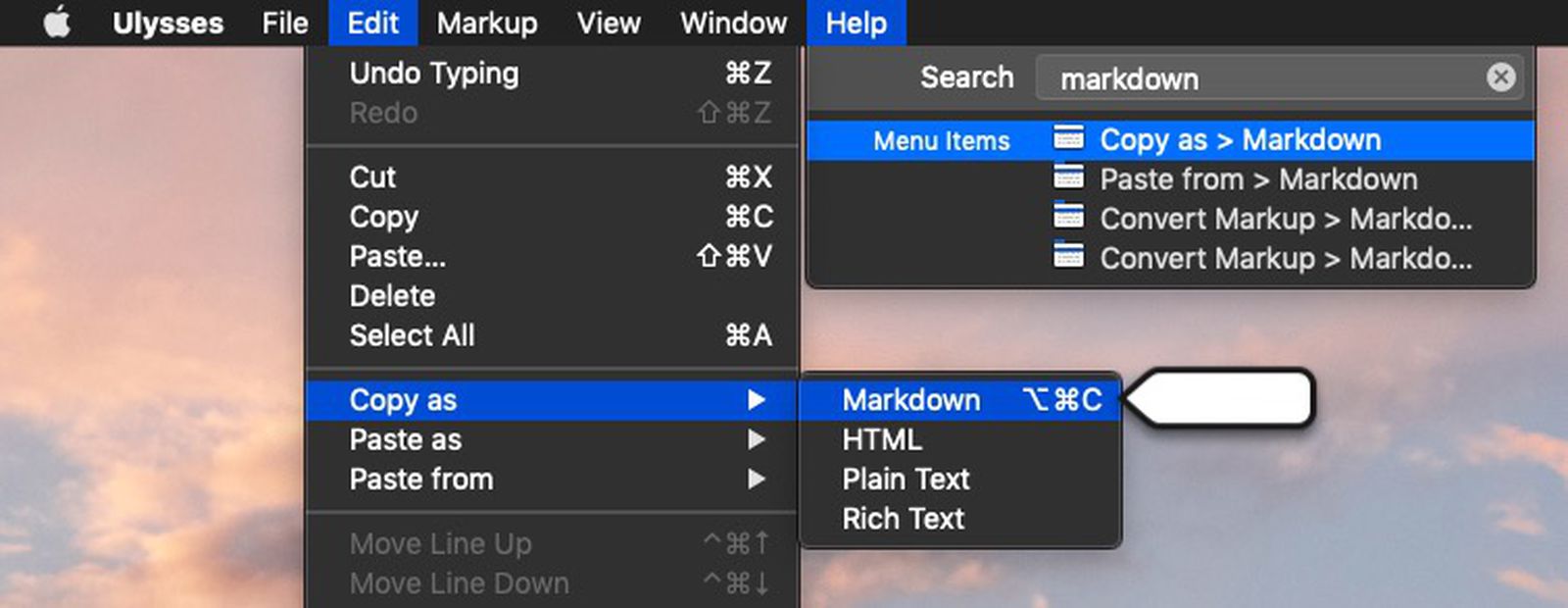
Another benefit that hasn't been mentioned yet is menu bars (e.g. File, Edit, View, Help, etc...)
Having a visible menu bar helps with feature discoverability.
While it's true that terminal-based editors can have menu bars (e.g. nano), they're more limited overall than what you'll find with native OS menu bars.
To start, terminal editors are limited to text rendering.
But native menus can have buttons, dropdowns, and input boxes.
Also, native menus are more readily explorable by users which teaches them what's possible. It places related functions near each other so the user can be aware of a function that's more applicable to their task at hand rather than the function they would have picked otherwise.
The native menus also include keyboard shortcut indicators and command pallet features which speed up a user's transition into a power user. You can see both here, the user types something in the search box at the top right, and then the relevant menu opens to reveal itself, related features, and keyboard shortcuts: https://images.macrumors.com/t/1nSQeW8SNfCYItiL2GsvvDYL1w0=/...
Editing root-owned files by opening an editor as root is generally considered to be an anti-pattern. There is sudoedit as an option, but that also works with VSCode (and has the same limitations roughly.) The better option is probably just not editing root-owned files directly except in an emergency; there's usually better approaches to deploying system-wide changes.
Generally, I think most people agree that directly editing live configuration files on systems is not the ideal way to manage systems. As for what to do instead, it strongly depends. On test or development systems, I suspect most people wouldn't bat an eye to just running Vim as root, but there are some other options:
- Use configuration management systems to provision configuration changes: Ansible, SaltStack, Chef, etc. (And yeah, when testing on development or test set ups/VMs, you might first try stuff with vim directly. But if you are pretty sure you know what you want, you can also just do it in the configuration management system, test it, and provision it.) -- This may seem overkill for local configuration but it's pretty handy.
- If possible, make use of features of your tools to require less root access. For example, in Nix there are various ways to move the Nix configuration for the system out of /etc/nixos and into a user directory, or some hybrid of the two. Maybe some services can be made rootless: either running as "user" services, or even under a rootless container.
- Make use of permissions or ACLs to give write access to a non-root user or group. Then you don't need to be root to edit or provision the files.
That's probably not going to happen as part of the core editor (there's a long discussion about this somewhere on the bug tracker) but should be easy to add using the now work-in-progress plugin system. Scroll down to the Examples section.
Funny how the maintainers preferred to build a plugin system instead of just the tree explorer, I suspect Helix will lose its biggest feature: no plugins and easy configuration :(
I used to use tree explorers all the time, but once I discovered fuzzy-search file explorers, I never used a tree explorer again. It’s been too long for me to remember why I liked tree explorers before or why I stopped using them, so I’m curious, what are the benefits of a tree explorer over a fuzzy-search file explorer?
I’m not questioning the usefulness or validity of tree explorers. I’m just trying to see things from a different perspective.
Tree-based finders allow you to explore a project.
Fuzzy finders only work when you already know what files exist.
Without a tree-based finder, you have no way to know which files exist in an unfamiliar project. Imagine being asked to change something in a project (e.g. add some extra space between two things on screen) without knowing what files existed. If you only rely on searching for names/terms that come to mind, you're probably going to miss the best way to accomplish the task at hand.
For discovering files in an unknown codebase I use the grep feature in Helix (or just ripgrep CLI). Way faster than going through a tree in most cases.
Tbh, I like having both, I find a fuzzy search is faster at finding what I want but a file tree is really helpful for building a mental model of directory relationships in a complex project.
Being made with gpui means it's mac-only right? Seems worth mentioning for anyone not familiar with the library and an odd choice if the goal is parity with Helix.
I had heard of that but went off the fact that MacOS is still a requirement in the repo readme.
Just had a peek in the build.rs and do see the windows target, which is great, Rust could definitely use some more cross-platform UI tooling
I have a similar setup in using helix with Alacritty. Of course Alacritty doesn’t provide a GUI (being a terminal emulator) but it is a very fast stack that looks quite nice.
Modal editing is an older concept, where by-default you can't hop in and start typing like normal. Most modal editors (including Helix) start you in a Normal mode, which is mostly used for reading and searching documents. Then you press a button (usually i or a) and get put into an Insert mode, where you can edit the text and type to your heart's content. Pressing escape will drop you back into Normal mode when you're done, where you can save the document and exit the editor.
It's a different workflow, but kinda nice when you want that IDE-style experience in a simpler interface like a TUI.
When you're not in insert mode, you have the whole alphabet of keyboard keys to act on the text without Ctrl/Alt/Shift/whatever combinations. So you can get a lot done with very few key presses, using shortcuts that make sense (e.g. "t." to select all text "to the next dot", and all that without straining your hands as you'd do when you use Ctrl/Alt/Shift modifiers. That last point is how I got into modal editors: Emacs keybindings were aggravating my RSI symptoms. It went away when I started using vim (and now helix).
Modal editors like vim and helix have modes[0] that allow for different operations.
Vim has
- normal mode which allows you to enter commands to manipulate text rather than just type characters in the file
- insert mode which allows you to enter text into a file
- replace mode which allows you to replace text
and a few others.
Most editors like vscode, sublime etc only have a single mode that they are always in IE insert mode. Modal editors have additional modes that allow for additional capabilities.
Just an editor with modes. Ie in vim you have have the default normal mode (move with hjkl) to move around the code without having to move your hands over to the arrows, insert mode to enter text, visual mode to select text, etc.
It typically means "something like vi", where there are "modes" like insert, normal, command, replace, visual, etc. that completely change the keybindings and are switched between by pressing certain keys in certain modes.
a modal editor is an editor with different editing modes, like Vim or Helix. Notepad for example is not a modal editor, and neither is VSCode by default.
Another example of a missing feature in high demand is the ability to pipe info about the current file (path, line number, etc) to a command, e.g., for a custom git blame command. Fortunately there is a PR for that and helix is easy to build from source.