I deleted the Uber app and stopped using their service specifically because there was no way to turn off only their spammy marketing push notifications, and I didn't want to turn off all push and miss a ride, so there was no way for me to meaningfully use their service. It's ok, I have other options to get a ride.
I found a way to disable marketing notifications but it was buried in their menus. Settings > Privacy > Notifications. Definitely shouldn't be under privacy, that makes no sense.
I had previously failed to find the Notification settings under Privacy that another commenter pointed me to--I think these solve my problem. If you found even more granular settings, please let me know where you're setting them.
A few months ago, I swear I went through every single setting in the app and failed to find anything like this, so maybe they've since updated their settings page?
That's exactly why I stopped using Uber. It was annoying to not get notification when drivers arrive, but there's no way I'm giving them free access to make my pocket vibrate all day long.
If you turn off notifications they will use text messages to contact you. I’ve never gotten a spam text message from them, which makes some sense as they’re more regulated than push notifications.
You could also be a hermit and live in the woods. Thats not really the point though. For paid services, I think it’s entirely reasonable to say that you don’t want to see ads.
I mean I went with "own a car and pick up food myself" instead of the whole hermitage thing, but to each their own
there have always been ads when I go to the movies, and in the magazines I pay good money for. nothing about paying for a product should give you an expectation of ad free, that's a very slim niche of a business model where they pummel you with ads until you subscribe a la spotify and youtube, but its not the norm at all
The difference here is that you see those ads when you go to the movies, or when you pick up the magazine. You're exposed to them on your own schedule. Phone notification ads, on the other hand, demand your attention with a sound or a vibration on their schedule.
I've never used Uber or Lyft and the last and only time I had pizza delivered was 20 years ago. There are more than enough food places and supermarkets within a 500m radius of my home, public transport here is pretty good or I can bike, rent a car or call a taxi for the few times I really need to go to the airport at 3 AM. YMMV.
Giving up on a product that only provides marginal value is hardly the same thing as becoming a hermit.
Uber eats isn’t integral to operating in modern society by a long stretch.
The hermit argument is trotted out far too often, it’s one thing if we are talking about something like a smart phone, but just because something is new or techy, doesn’t mean you are a Luddite for not using it.
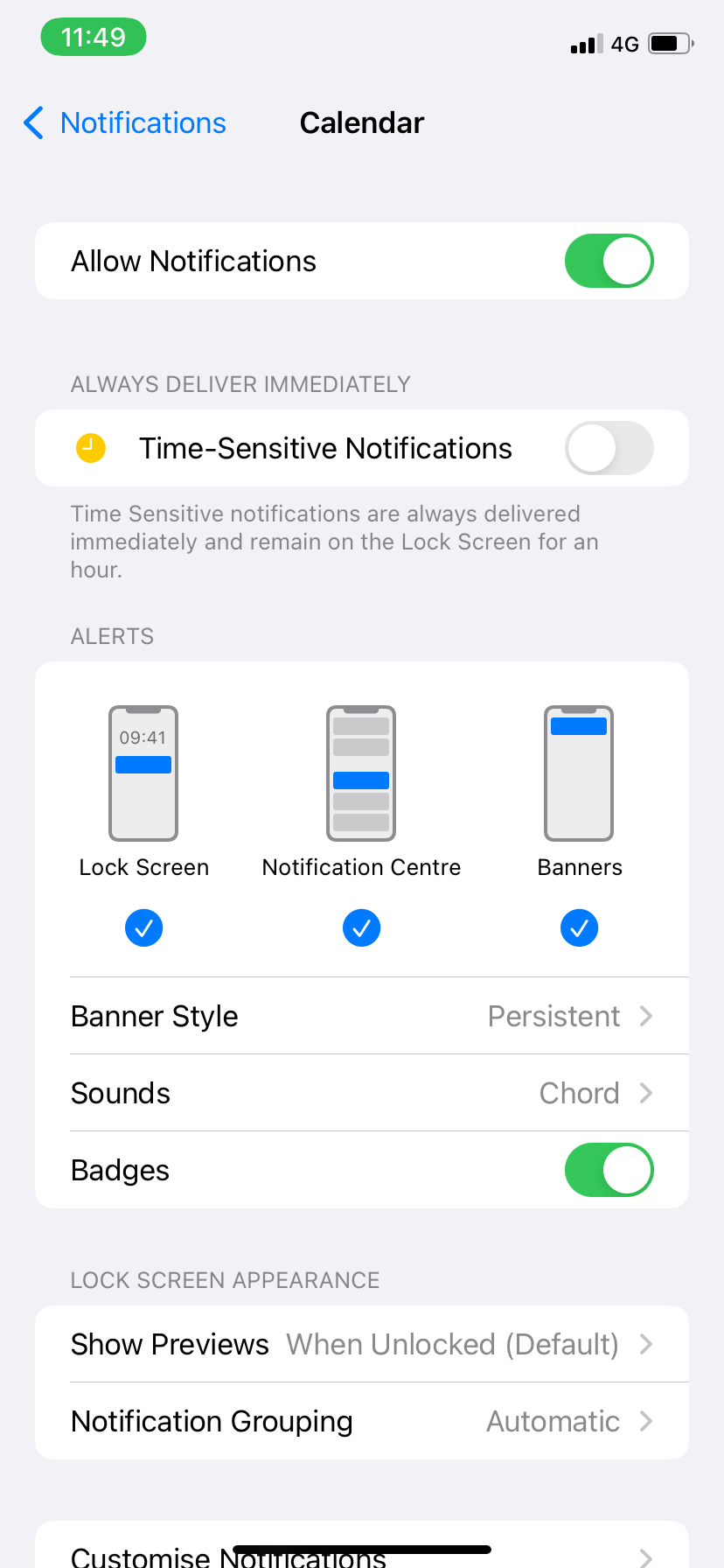
That setting doesn't do what you think it does. As per the tooltip[1], all that does is cause notifications from uber to be delivered regardless of focus settings (eg. if you have work focus on and uber sends you a notification it will show up immediately rather than being hidden/delayed). You'll still get other notifications if you don't have focus on.
I would think that if you disable the three notifications at the bottom
and enable “time sensitive notifications”, if Uber is a well behaved app, it should only notify you for things that are time sensitive. I won’t know for sure for awhile.
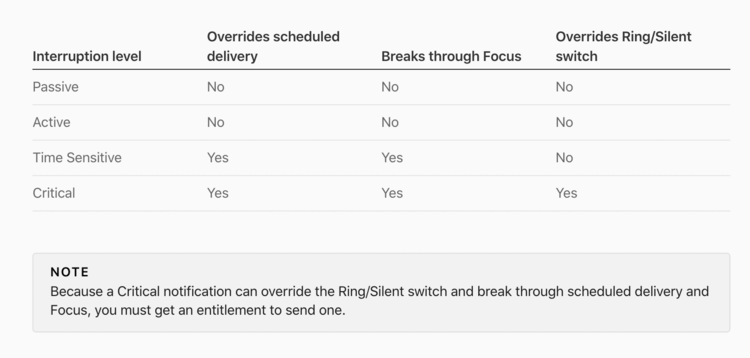
> Apple has provided developers with the freedom to categorize the outgoing notifications from their apps, with guidance from a new notification classification scale. Developers can decide on the appropriate interruption level for their app notifications, however Apple has warned that users can completely turn off app notifications if they feel a high level of urgency is being used unnecessarily.
Right, but if you dig deeper into the article it's clear that the difference between the notification types is whether they override various settings. As per the chart[1], the main difference is whether it breaks through various delivery settings (eg. scheduled delivery, Focus, Ring/Silent switch). There isn't some sort of setting that the user can set that tells the os "I only want time sensitive notifications from this app" (I suppose there is, if you want to have focus on 24/7 or something, but that's more of a hack than an actual feature).


My problem is that I do want notifications for when my driver has arrived.